 BikeOtter
Wahoo ELEMNT routes not syncing? Every fix, step by step
A route goes from the planner, to your Wahoo account, to the unit. Find the step where yours stops, and the fix is usually two minutes.
First check whether the route shows up in the Wahoo app's route list. If it doesn't, the link between your Wahoo account and the route service is the problem: disconnect the service in the app's Authorized apps and connect it again. If the route is in the app but not on the unit, the unit hasn't synced yet: send that one route over Bluetooth from the app, or press Sync on the unit's Routes page while it is in range of a saved Wi-Fi network.
Where do I look for the route in the app?
A route travels in two hops. The route service (Komoot, Ride with GPS, Strava) hands it to your Wahoo account, and the unit then fetches it from the account. The app's route list shows the first hop.
- Wahoo app (ACE, BOLT 3, ROAM 3): Explore, then My Collection, then My Routes.
- ELEMNT app (older units): the Workout tab, then Choose a route.
If the route is listed there, skip ahead to the section on routes that are in the app but not on the unit. If not, read on.
Why is my route not in the Wahoo app?
Each service only sends certain routes. Check that yours is one of them.
- Komoot: planned tours, set to a cycling sport, in a region your Komoot account has unlocked (or with Komoot Premium). Wahoo's help notes that Komoot users without Premium can only sync routes in their free region or regions they have bought. The Komoot guide goes through these one by one.
- Ride with GPS: routes you created or saved, and routes you pinned.
- Strava: routes you created or saved, and routes you starred.
Also check that you linked the same account you planned the route in. Komoot's own help asks you to be signed in to the same Komoot account on the website, in the Komoot app and in the Wahoo app.
How do I reset the link to Komoot, Ride with GPS or Strava?
Wahoo's first fix for a link that has stopped working is to disconnect it and connect it again.
In the Wahoo app:
- On the Today tab, tap your profile icon in the top left corner.
- Open Authorized Apps.
- Expand the service with the arrow next to it and choose Deauthorize.
- Pick it again from the list of available apps and sign in.
In the ELEMNT app:
- Open the Profile tab, then Authorized apps.
- Select the service and choose Deauthorize.
- Select it again and sign in to reauthorize.
Then check the route list again.
Why is the route in the app but not on the unit?
Because the unit has not fetched it yet. There are two ways to make it.
- One route, over Bluetooth. With the unit connected to the app, open the route and choose Send to ELEMNT (Wahoo app) or Select route (ELEMNT app). This loads it for the next ride.
- The whole library, over Wi-Fi. The unit downloads your linked routes when it syncs on Wi-Fi, which happens when it starts up in range of a saved network. To force it, open the Routes page on the unit and press Sync.
A Wi-Fi sync needs the unit itself to be on a network it knows. If it was set up on a different network, add your current one in the app first.
Why can't I see any routes on the unit?
On the older units, the route list can be sorted by proximity. If it is, and the unit has no GPS fix yet, the list shows nothing. Go outside and wait for a fix, or sort by name.
Why does a route I deleted keep coming back?
Routes from a linked service are managed in that service, not in the Wahoo app. To remove one, delete it in Komoot, or un-pin it in Ride with GPS, or un-star it in Strava. It disappears from the unit at the next Wi-Fi sync. Routes you imported as a file are the exception: those you delete in the Wahoo app itself.
Where did the waypoints on my Strava routes go?
Wahoo has announced waypoint support for the ACE, BOLT 3 and ROAM 3, from firmware 301724. Its help page says Strava routes synced before that update don't carry waypoints, and lists a fix: deauthorize Strava, sync the unit on Wi-Fi so the old copies are removed, reauthorize Strava and sync again. Whether stops then show up depends on the unit, the firmware and how the route was made. The stops guide has the details.
Update everything, then restart
If the steps above didn't help: update the unit's firmware (this needs Wi-Fi), the Wahoo or ELEMNT app and the route service's app. Restart the phone and the unit. Then try a short test route, planned fresh, to rule out one broken route.
The way that skips the cloud
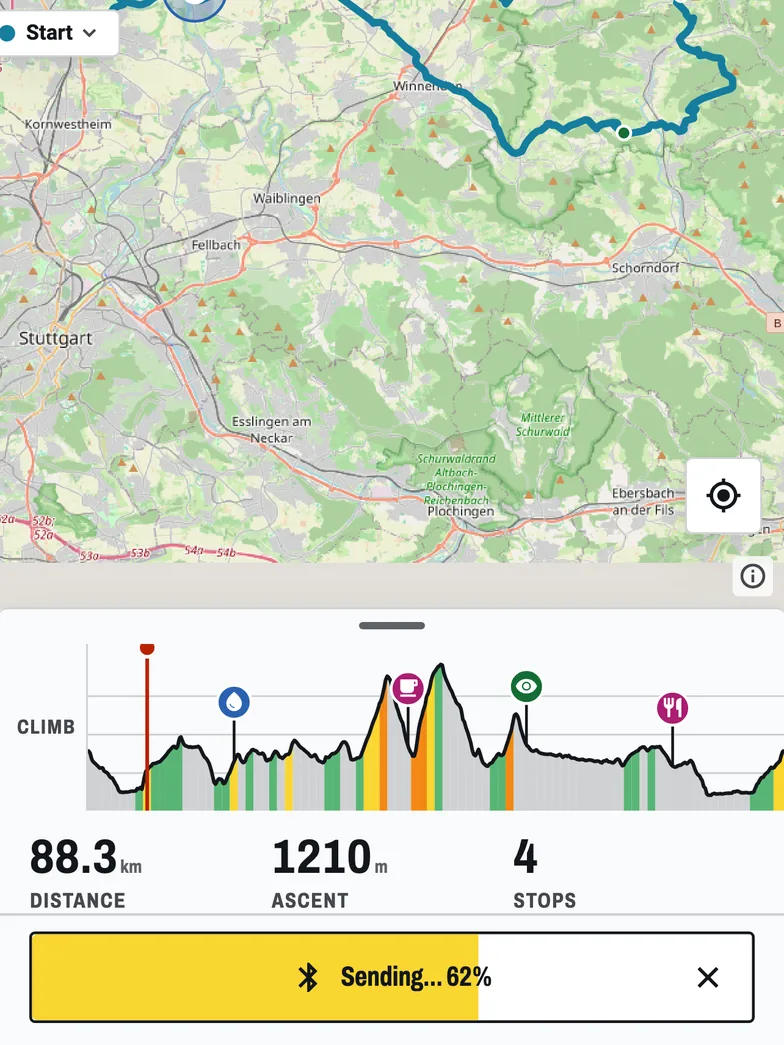
When a route won't sync and you need it on the unit now, a direct push avoids both hops. BikeOtter sends a route from the phone to the ELEMNT over Bluetooth, without your Wahoo account or the route service's link in the path.
- Export the route as a GPX file from the planner (most planners offer this) and share it to BikeOtter.
- Check it in the editor and tap Send.
If the route already reached the unit once, for example from Komoot, BikeOtter can also read the routes stored on the ELEMNT and import one from there. Sending is free. The ELEMNT takes one phone connection at a time, so disconnect the Wahoo app first, and use Disconnect everything in BikeOtter when you want it back.
Which way should I use?
For a library you plan in Komoot, Ride with GPS or Strava, the linked sync is worth fixing: once it works, routes arrive on their own. Reauthorize first, then check the route type and account, then force a sync. For a single route you need today, export the GPX and send it directly, over the Wahoo app as described in the GPX guide or straight over Bluetooth.
Related guides
Where these steps were checked
The official steps above follow the vendors' own help pages as of 25 Oct 2026. Menus move between app versions. If a step here no longer matches what you see, send a note to support and the guide gets fixed.
- Wahoo: Sync routes from a third party route provider app / service (ACE, BOLT 3, ROAM 3)
- Wahoo: Sync / download third party routes to ELEMNT computers
- Wahoo: Authorize an app partner to sync routes, planned workouts, completed rides, or segments
- Wahoo: Authorize a 3rd party app for route / planned workout sync or completed ride upload (ELEMNT)
- Wahoo: Import and delete routes to ELEMNT computers
- Wahoo: Custom Waypoints and POIs on ELEMNT ACE, BOLT 3 and ROAM 3