 BikeOtter
Komoot route not showing on your Wahoo ELEMNT? How to fix it
Most missing Komoot tours come down to one of four things in Komoot itself. Check those, then pick the way to send it that suits your unit.
Start in Komoot. The tour has to be saved as a planned tour, set to a cycling sport, and lie in a map region your Komoot account has unlocked (or you need Komoot Premium). Then check that the Wahoo app is linked to that same Komoot account. Once the tour shows up in the Wahoo app, send it to the unit over Bluetooth, sync the unit on Wi-Fi, or on an ACE, BOLT 3 or ROAM 3 use Komoot's Live Sync.
Will Komoot send this tour at all?
Go through these in Komoot before touching the Wahoo side.
- Is it saved? Only saved, planned tours sync. A tour you only looked at is not in your account.
- Is it a cycling tour? Komoot only sends cycling routes to Wahoo. If the sport is hiking or running, change it to a cycling type, such as road cycling or mountain biking, and save again.
- Is the region unlocked? Komoot syncs routes in your free region, in regions you have bought, or anywhere with Premium. A tour outside those regions won't sync to the device.
- Is it the same account? Komoot asks you to be signed in to the same Komoot account on the website, in the Komoot app and in the Wahoo app. A second account made with another email is easy to miss.
How do I connect Komoot to the Wahoo app?
In the Wahoo app (ACE, BOLT 3, ROAM 3), tap your profile on the Today tab, open Authorized Apps and choose Komoot. In the ELEMNT app for older units, it is Profile, then Authorized apps (or Connected apps on Android), then Komoot. Sign in to Komoot and tap Grant Access.
Your planned tours then appear in the app's route list.
How do I send a Komoot tour with Live Sync?
Live Sync is for the ACE, BOLT 3 and ROAM 3. It sends one tour from Komoot straight to the unit, through the Wahoo app.
- Make sure the unit is on and connected to the Wahoo app, and the app is open (it can be in the background). Your phone needs a data connection.
- In Komoot, open the saved tour and tap Navigate.
- Choose Wahoo Fitness.
- The unit beeps and shows Route Received. Press Accept, or wait: it loads by itself after 15 seconds.
If you see Live Sync timeout, send the tour again from Komoot. No connection means the phone lost data. A message asking you to unlock the map region means the tour is outside your Komoot regions.
How do I get a Komoot tour onto an older ELEMNT?
There are two ways once the tour is in the ELEMNT app.
- Bluetooth, one tour: in the ELEMNT app, open Workout, then Choose a route, pick the tour and tap Select route.
- Wi-Fi, all tours: with the unit on a saved Wi-Fi network, open the Routes page on the unit and press Sync.
Komoot's help adds one detail worth knowing: it says Bluetooth syncing only works if the unit has not been set up with Wi-Fi. If Bluetooth does nothing on a unit that has Wi-Fi set up, use the Wi-Fi sync instead.
Still not there?
Komoot's own troubleshooting order is a good one:
- Update the unit's firmware, the Wahoo or ELEMNT app and the Komoot app. Restart the phone and the unit.
- In the Wahoo app, disconnect Komoot under Authorized apps, then connect it again and grant access.
- Plan a short test tour and sync that. If the test arrives, the problem is the one tour, not the link.
- As a fallback, download the tour from Komoot as a GPX file and import it directly. The GPX guide has the steps.
For problems that aren't specific to Komoot, see routes not syncing.
Do Komoot highlights and waypoints come along?
It depends on how the tour travels. Komoot's help says a GPX download contains only the route line: waypoints you added while planning are not included. For synced tours on the ACE, BOLT 3 and ROAM 3, Wahoo has announced support for Komoot points of interest that were included as waypoints in the tour; custom names or details you changed are not passed on. In practice, whether they show depends on the unit and its firmware, so check on yours before a ride that relies on them. The stops guide covers other ways.
The way that skips the cloud
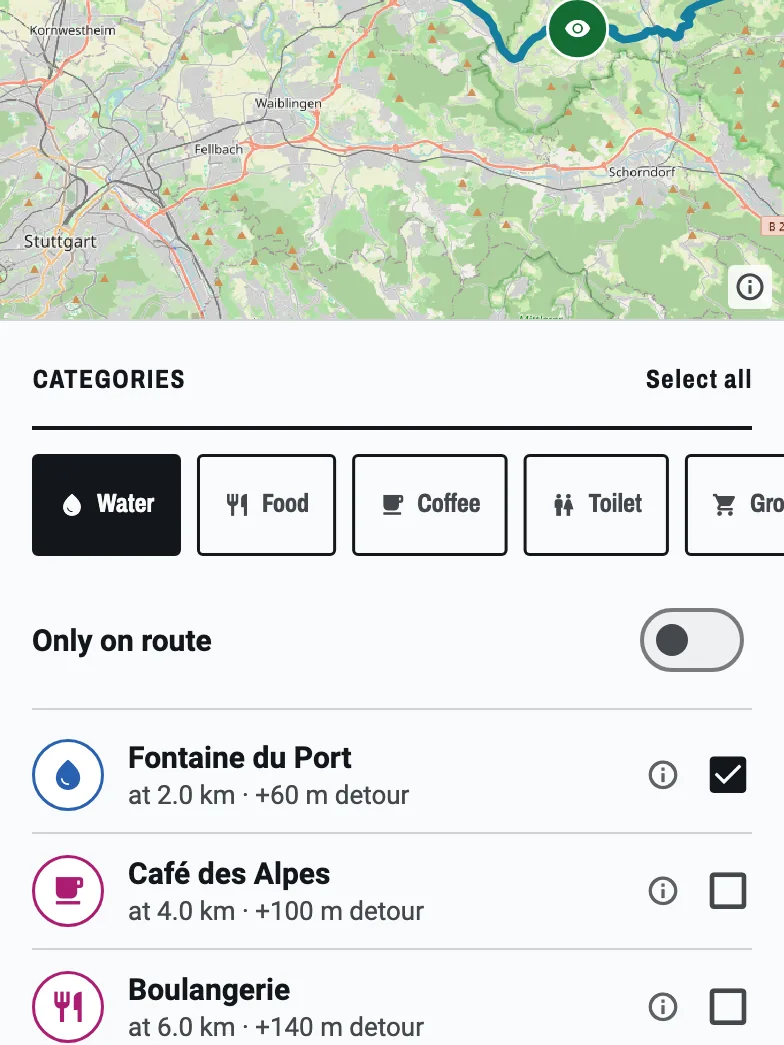

If the link won't cooperate, BikeOtter takes the tour from your phone to the ELEMNT over Bluetooth, without the Komoot to Wahoo link.
- In Komoot, open the tour and download it as a GPX file. Komoot needs the start region unlocked for this.
- Share the file to BikeOtter.
- Check the route and tap Send.
Because the GPX carries only the line, add the stops you care about in BikeOtter before you send: water, food, a café. Those arrive on the unit's map with the route. The stop search along the route is part of BikeOtter Plus, with a few free goes to try it. BikeOtter does not link to your Komoot account, so there is no automatic sync. If Komoot already put the tour on the unit, BikeOtter can read it back off the ELEMNT and save it to the phone.
Which way should I use?
If you plan a lot in Komoot and ride a third-generation unit, get the link working and use Live Sync: it is quick when the phone has data. On an older unit, a Wi-Fi sync at home keeps all your tours on the unit. When the link fails and you need one tour today, or you want your own stops on it, download the GPX and send it directly.
Related guides
Where these steps were checked
The official steps above follow the vendors' own help pages as of 25 Oct 2026. Menus move between app versions. If a step here no longer matches what you see, send a note to support and the guide gets fixed.
- Komoot: Connect Wahoo to komoot
- Komoot: Wahoo troubleshooting
- Komoot: Use komoot on connected devices
- Komoot: Export and import Routes and Activities
- Wahoo: Komoot Live Sync for ELEMNT ACE, BOLT 3 and ROAM 3
- Wahoo: Sync / download third party routes to ELEMNT computers
- Wahoo: Custom Waypoints and POIs on ELEMNT ACE, BOLT 3 and ROAM 3