 BikeOtter
How to get a route onto a Wahoo ELEMNT without Wi-Fi or signal
What the Wahoo app can still do when you're offline, how to get ready before you lose signal, and the ways that need no internet at all.
You need internet once, but not at the moment you load the route. Get the route into the Wahoo app while you still have signal: on an ACE, BOLT 3 or ROAM 3, the app can then send it to the unit over Bluetooth with no data connection. If the route is new and you have no signal at all, copy it over USB from a computer, or push the file from your phone over Bluetooth with an app that talks to the ELEMNT directly.
Why does the Wahoo app need internet for a route?
Because a route goes through your Wahoo account before it reaches the unit. When you import a GPX file, the app uploads it to Wahoo's cloud, where it is converted into a route the ELEMNT can use. Routes from Komoot, Ride with GPS or Strava reach your account the same way, through the link between the two services.
So the step that needs a connection is getting the route into your account. What happens after that depends on the unit:
- ACE, BOLT 3, ROAM 3: once a route is in the Wahoo app, Wahoo's help says it can be sent to the unit over Bluetooth with or without a phone data connection.
- ELEMNT, BOLT 1 and 2, ROAM 1 and 2: Wahoo lists an internet connection for the ELEMNT app as a requirement for loading even a single route.
How do I get routes onto the unit before I lose signal?
The most reliable way is a Wi-Fi sync at home. Routes synced this way are stored on the unit and stay there until the next sync.
- Connect the unit to your home Wi-Fi. You set the network up through the app.
- Make sure the routes you want are in the app: imported, or synced from a linked service.
- On the unit, open the Routes page and press Sync.
Do this the evening before a trip, not at the trailhead.
If you are travelling with a phone that has mobile data but there is no Wi-Fi, you don't need Wi-Fi. A single route goes over Bluetooth from the app, as described in the GPX guide.
Can I make a route on the unit itself?
On an ACE or ROAM 3 you can pick a place on the unit's own map and it routes you there, using the maps and routing engine on the device. Wahoo lists this as not available on the BOLT 3, which has no touchscreen. These are temporary routes, built from where you are now, so they suit "take me to the station" better than a planned day out. Make sure the maps for the region are downloaded to the unit before you travel.
Can I use a USB cable instead?
Yes, if you have a laptop with the file on it. The ELEMNT appears as a media device (MTP). On a Mac you need an MTP app such as OpenMTP.
- Switch the unit on and connect a USB data cable.
- Copy the GPX or TCX file into the unit's routes folder.
- Disconnect and pick the route on the unit.
On a third-generation unit, USB access is off until you turn it on in the Wahoo app (Devices, your unit, Settings). That switch needs the app, so set it at home if you think you'll need it. Files copied in by hand stay on the unit only and don't appear in the app.
The way that skips the cloud
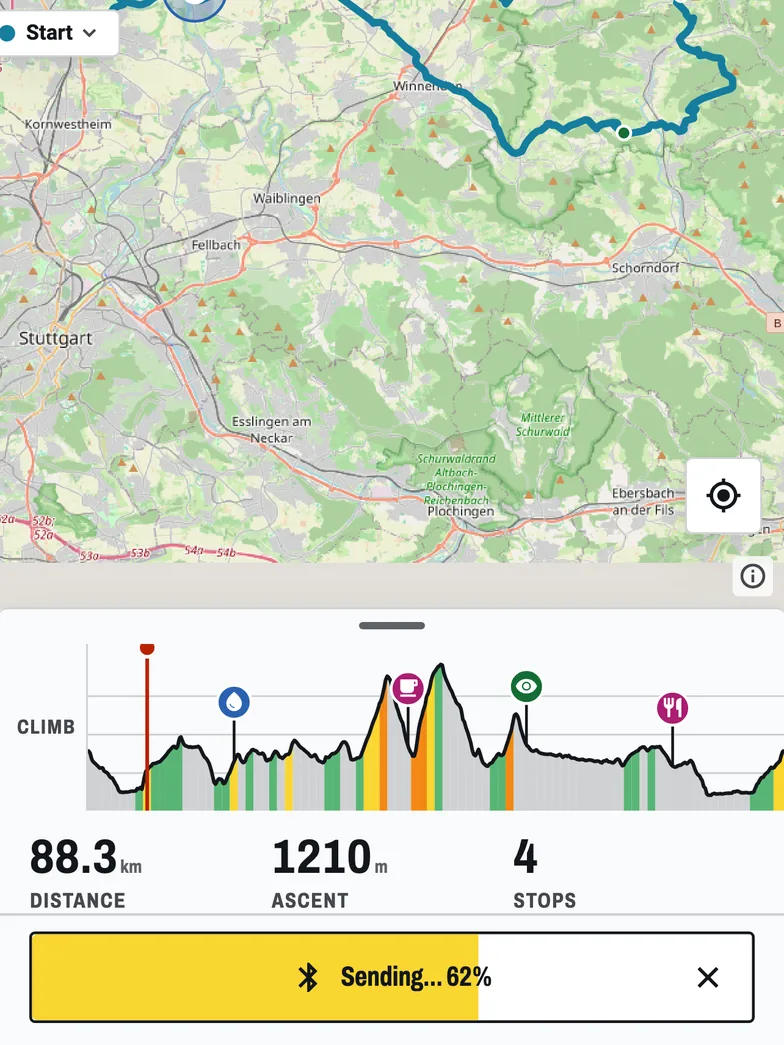
BikeOtter sends a route from the phone to the ELEMNT over Bluetooth, in the unit's own protocol. Nothing is uploaded and nothing is converted on a server, so the push works in airplane mode with Bluetooth on.
- Get the GPX or FIT file onto your phone. Downloaded earlier, from an email, or from a friend at the start line by AirDrop or Quick Share, which work without internet.
- Share or open the file in BikeOtter.
- Tap Send.
Stops in the file arrive with the route and show on the unit's map. Two limits to know: planning a new route in the app needs a connection, because the routing runs online, and the first-time setup of a new unit still happens in the Wahoo app. With BikeOtter Plus you can also download a route's map and the stops along it to the phone ahead of time, so the map and a stop search keep working with no signal (two downloads are free to try). The ELEMNT holds one phone connection at a time, so close or disconnect the Wahoo app first.
Troubleshooting
- Wi-Fi sync finds nothing. The unit only syncs routes that are already in your Wahoo account. Check the app's route list first, then sync again in range of a network the unit has saved.
- The route list on the unit looks empty. On the older units, if routes are sorted by proximity and the unit has no GPS fix yet, no routes are shown. Wait for a fix or sort by name.
- Bluetooth send hangs. Check that the unit is connected to the app you are sending from. The ELEMNT holds one phone connection at a time, so a second app can't reach it while the first one is connected.
- A USB route isn't in the Wahoo app. That's expected. Hand-copied routes live only on the unit.
Which way should I use?
If you know the trip in advance, sync over Wi-Fi at home and the problem goes away. On a third-generation unit, a route already in the Wahoo app can go over Bluetooth later with no signal. On an older unit, plan to have data or Wi-Fi when you load the route. For a file you only get on the day, a laptop and cable works, and a direct Bluetooth push from the phone works with nothing else. If routes don't show up even with a connection, see routes not syncing.
Related guides
Where these steps were checked
The official steps above follow the vendors' own help pages as of 25 Oct 2026. Menus move between app versions. If a step here no longer matches what you see, send a note to support and the guide gets fixed.
- Wahoo: Routes with ELEMNT ACE, BOLT 3 and ROAM 3
- Wahoo: Import a FIT, GPX, or TCX route file via the Wahoo app (ACE, BOLT 3, ROAM 3)
- Wahoo: Sync / download third party routes to ELEMNT computers
- Wahoo: Connect an ACE, BOLT 3 and ROAM 3 to a desktop/laptop computer
- Wahoo: Connect an ELEMNT, BOLT 1/2, or ROAM 1/2 to a desktop/laptop computer