 BikeOtter
Wahoo ELEMNT rides not uploading to Strava? How to fix it
A ride reaches Strava in two hops: unit to Wahoo, then Wahoo to Strava. Find the hop where yours is stuck, and fix that one.
First check whether the ride is in the Wahoo app's History. If it isn't, the ride is still on the unit: connect the unit to the app with a data connection on the phone, or sync it on Wi-Fi. If it is in History but not on Strava, check that Strava is authorized in the app with auto-share switched on (it is off by default in the Wahoo app), then disconnect Strava and connect it again. A single missing ride can always be shared by hand from the ride, or uploaded as a FIT file on the Strava website.
Has the ride reached the Wahoo app?
Strava gets your ride from Wahoo's cloud, not from the unit. So the first hop is unit to Wahoo, and it happens in one of two ways:
- Bluetooth: the unit is connected to the Wahoo app, and the phone has a data connection to pass the ride on to Wahoo's cloud.
- Wi-Fi: the unit uploads the ride itself when it syncs on a saved network.
To force it in the Wahoo app (ACE, BOLT 3, ROAM 3), check under Devices that the unit is connected, then open History and pull the list down. To force it on the unit over Wi-Fi, select Workouts and then Sync. A long ride with many sensors takes a while.
If the ride never shows in History, the problem is on this first hop, and nothing on the Strava side will fix it.
Is Strava set up to receive rides?
In the Wahoo app:
- On the Today tab, tap your profile icon, then Authorized Apps.
- Check that Strava is listed as authorized. If not, select it and sign in.
- Expand Strava with the arrow and turn Auto-share on.
Auto-share is off by default, so a newly linked Strava account won't receive rides until you switch it on.
In the ELEMNT app for older units:
- Check under Profile, Authorized apps that Strava is authorized.
- Open the Settings tab and check that Automatic upload is on.
- Open that item and check that Strava is switched on inside it.
Why did only my older rides not upload?
Strava's help says activities uploaded before you connected Strava won't sync. Linking Strava today doesn't send last week's rides. Share those by hand, as below.
How do I reset the Strava connection?
Wahoo's first fix for a connection that has stopped sharing is to disconnect it and connect it again.
- In Authorized Apps (Wahoo app) or Authorized apps (ELEMNT app), open Strava.
- Choose Deauthorize.
- Select Strava again and sign in to reauthorize.
- In the Wahoo app, turn Auto-share back on.
How do I send one ride by hand?
From the Wahoo app:
- Open History and the ride.
- Tap the three dots, choose Share activity, then Share to connected app, and share it to Strava.
If that fails too, download the ride's FIT file (the FIT file guide has the steps) and upload it at strava.com/upload/select in a browser. Strava accepts FIT, GPX and TCX files up to 25 MB.
The way that skips the cloud
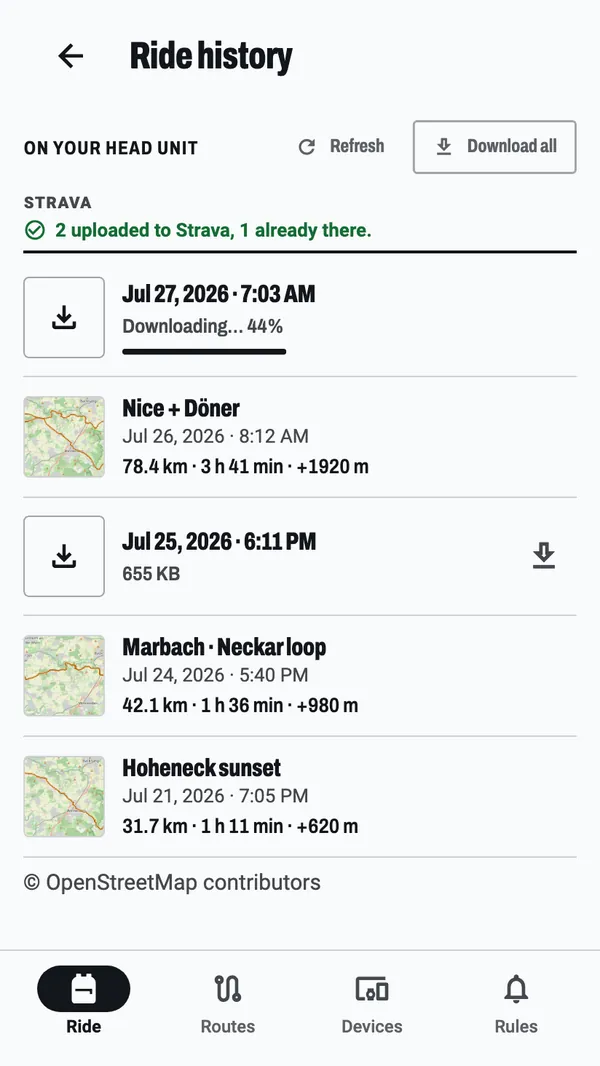
BikeOtter can take the ride off the ELEMNT over Bluetooth and upload it to Strava from the phone, so the ride doesn't depend on Wahoo's cloud or a Wi-Fi sync.
- In BikeOtter, connect your Strava account under Settings, Connections.
- Switch on Strava auto-upload if you want every ride to go by itself.
- Connect the unit and open Ride history. Download the rides still on the unit, or let BikeOtter fetch the ride when it ends.
Rides queue and upload one at a time, oldest first. If the phone is offline, or Strava is busy, the queue waits and carries on at the next app start. Each ride's Strava button shows Queued for Strava until it becomes View on Strava. If the Wahoo app already sent a ride, Strava won't add it twice, and BikeOtter counts it as already there. Downloading rides and uploading to Strava are both free.
If Strava refuses the connection in its own sign-in screen, which can happen when an app reaches Strava's limit on connected riders, BikeOtter can use a free Strava API key of your own. The setup screen under Connections walks you through it.
Troubleshooting
- The ride is in History with no upload. Check auto-share for Strava, then share the ride by hand.
- The unit has the ride, the app doesn't. Fix the first hop: Bluetooth connection with phone data, or a Wi-Fi sync. If the ride still won't move, copy the FIT file over USB.
- Wrong date on old rides. The original ELEMNT, BOLT 1 and ROAM 1 on older firmware wrote some rides from August 2025 with a 2006 date, so they sort to the bottom of History. Wahoo's help explains how to fix them.
Which way should I use?
If rides normally reach Strava and one is missing, share it by hand from the Wahoo app. If none are arriving, check auto-share and reauthorize Strava: that fixes most cases. If the first hop is the problem, because you ride where there is no signal or the unit rarely sees Wi-Fi, take the ride off the unit directly and upload it from the phone. For routes that won't arrive the other way, see routes not syncing.
Related guides
Where these steps were checked
The official steps above follow the vendors' own help pages as of 25 Oct 2026. Menus move between app versions. If a step here no longer matches what you see, send a note to support and the guide gets fixed.
- Wahoo: Upload and share a completed ride from ELEMNT ACE, BOLT 3 and ROAM 3
- Wahoo: Authorize an app partner to sync routes, planned workouts, completed rides, or segments
- Wahoo: Authorize a 3rd party app for route / planned workout sync or completed ride upload (ELEMNT)
- Strava: Wahoo ELEMNT and Strava
- Strava: How do I get my activities to Strava?