 BikeOtter
How to download a ride's FIT file from a Wahoo ELEMNT
The FIT file is the full record of a ride, with power, heart rate and laps. Four ways to get your hands on it, and what each one needs.
Once the ride has synced to the Wahoo app, open it in History, tap the three dots, choose Share activity and then Download .fit activity. Your phone's share menu opens, and you can save the file or send it to another app. That needs the ride to have reached Wahoo's cloud first. If it hasn't, copy the file from the unit's exports folder over USB, or pull it off the unit over Bluetooth with an app that reads the ELEMNT directly.
How do I download the FIT file in the Wahoo app?
For the ACE, BOLT 3 and ROAM 3:
- Make sure the ride is in the app. With the unit connected, open History and pull the list down to sync any rides that haven't uploaded yet.
- Open the ride.
- Tap the three dots in the top right corner of the ride's summary.
- Choose Share activity, then Download .fit activity.
- The phone's share menu opens. Save the file to Files, or send it to another app.
How do I get the file from the ELEMNT app?
The older units use the ELEMNT app. Wahoo's help describes the steps when walking riders through recovering a ride file:
- Open the History tab and open the ride.
- On iPhone, tap the upload icon in the top right corner. On Android, tap the three dots and then Upload workout.
- Choose Share file to... and pick where to send it: your mail app, Files, or another app.
Why isn't my ride in the app yet?
Because it is still only on the unit. A ride gets to the app one of two ways, and both need the internet:
- Bluetooth to the app. The unit has to be connected to the app, and the phone needs a data connection to upload the ride to Wahoo's cloud.
- Wi-Fi from the unit. The unit uploads the ride itself when it syncs on a saved Wi-Fi network. On a third-generation unit, select Workouts and then Sync to force it.
Until one of those happens, the app has nothing to share. A long ride with many sensors also takes a while to transfer, so give it time before trying again.
Can I copy the FIT file over USB?
Yes. Rides are stored on the unit as FIT files in the exports folder, named by date (YYYY-MM-DD...).
- Switch the unit on and connect it to a computer with a USB data cable.
- Open the unit. Windows shows it directly; on a Mac you need an MTP app such as OpenMTP.
- Open exports and copy the file with the ride's date.
On an ACE, BOLT 3 or ROAM 3, USB access is off by default. In the Wahoo app, go to Devices, your unit, Settings, and turn on both Allow USB access and Allow .FIT file access. Wahoo points riders to this when a ride won't sync any other way.
Can I get every ride automatically?
The Wahoo app can share each finished ride to a connected service. Dropbox is one of the partners for activity files, so authorizing it and turning on auto-share leaves a copy of every ride in your Dropbox. Auto-share is off by default, and it runs after the ride reaches Wahoo's cloud. For Strava, see rides not reaching Strava.
The way that skips the cloud
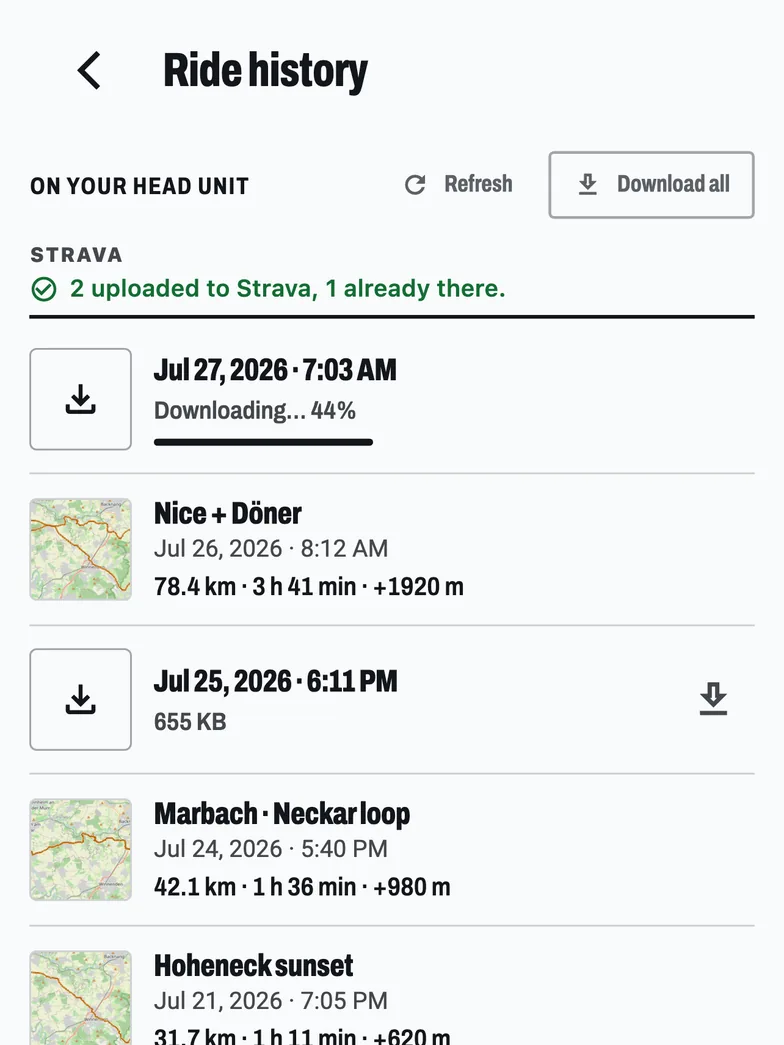
BikeOtter reads the rides stored on the ELEMNT over Bluetooth and copies them to the phone. The internet isn't involved, so it works in a hut with no signal, and on a ride the cloud never received.
- Connect the unit in BikeOtter and open Ride history. Rides still on the unit are listed next to the ones already on the phone, in one list by date.
- Tap a ride to download it, or take them all at once. Each one shows its progress, with a retry if the link drops.
- Open the ride and choose Share workout (FIT). The phone's share menu opens with the ride's FIT file, ready for Files, mail, a training app or a coach.
Downloading rides is free. On Android, Share to Wahoo hands the file straight to the Wahoo app if it's installed. Strava upload from BikeOtter is free too, and you can switch it on to happen by itself. The ELEMNT holds one phone connection at a time: disconnect the Wahoo app first, and use Disconnect everything in BikeOtter to hand the unit back.
Troubleshooting
- No three dots, or no download option. Update the Wahoo app. Wahoo's own help pages show more than one name for this menu, so look for Share activity or Sharing.
- The ride is dated 2006. The original ELEMNT, BOLT 1 and ROAM 1 on older firmware wrote some rides from 17 August 2025 onwards with a 2006 date. Wahoo's help explains how to find them (filter History by year) and fix the date with a FIT file tool.
- USB shows the unit but no exports folder. On a third-generation unit, the .FIT file access switch is separate from USB access. Both need to be on.
Which way should I use?
If your rides already sync to the Wahoo app, its Download .fit activity is the quickest way to the file. Turn on Dropbox auto-share if you want every ride kept somewhere without thinking about it. When a ride is stuck on the unit, or you're somewhere without signal, copy it over USB from a computer or pull it over Bluetooth to the phone.
Related guides
Where these steps were checked
The official steps above follow the vendors' own help pages as of 25 Oct 2026. Menus move between app versions. If a step here no longer matches what you see, send a note to support and the guide gets fixed.
- Wahoo: Share an activity to a third party app (Wahoo app), Download .FIT activity
- Wahoo: Upload and share a completed ride from ELEMNT ACE, BOLT 3 and ROAM 3
- Wahoo: Retrieve / change ride files from ELEMNT, BOLT 1, or ROAM 1 from August 2025
- Wahoo: Connect an ACE, BOLT 3 and ROAM 3 to a desktop/laptop computer
- Wahoo: Connect an ELEMNT, BOLT 1/2, or ROAM 1/2 to a desktop/laptop computer