 BikeOtter
Wahoo Live Track not working? How to fix it
Live Track runs on your phone, not on the unit. Most failures are the phone putting the app to sleep, a missing permission, or the unit dropping its link.
Live Track sends your position from the phone, so the phone has to stay connected to both the unit and the internet for the whole ride. Check four things: Live Track is switched on in the app, the app is open in the background (not force-closed), battery optimisation is off for it, and the unit shows a solid phone icon. Then share a fresh link. On an ACE, BOLT 3 or ROAM 3, the Live Track page in the Wahoo app shows a status that tells you which of these is missing.
How does Wahoo Live Track work?
The ELEMNT passes your position to the Wahoo app or ELEMNT app over Bluetooth. The app sends it to Wahoo's servers, and anyone with the link watches on a web page. Wahoo's help says viewers see your current location, the route you have ridden and your current ride data.
That chain has three links, and any of them can break: unit to phone, phone app staying awake, phone to internet. Fixing Live Track means finding which one.
How do I set up Live Track on an ACE, BOLT 3 or ROAM 3?
- In the Wahoo app, on the Today tab, tap your profile icon in the upper left corner.
- Select Live Track and make sure it is switched on.
- To send the link by email at every ride, use Auto-share, then Add, and pick contacts or type an address.
- To send a link yourself, tap Share Link next to Public link and choose a messaging app, or copy it.
Wahoo's requirements: the phone needs a data connection (VPNs are not supported), the unit needs a GPS lock and must stay connected to the Wahoo app all ride, and the app must be opened and then can go to the background, but must not be force-closed. Battery optimisation has to be off for the app. A shared link expires after 12 hours without riding.
What does the Live Track status in the Wahoo app mean?
The Live Track page shows a status line. Wahoo lists these:
- Ready: everything is in place.
- Disabled: Live Track is switched off.
- Not permitted: the app is missing a permission. Check the phone's settings for the Wahoo app.
- ELEMNT disconnected: the unit has been disconnected from the app for over 10 minutes.
- No Network connection: the phone has had no internet for over 10 minutes.
After 10 minutes without a connection, the unit also shows an alert you have to dismiss. Wahoo says tracking resumes by itself once the connection is back.
How do I set up Live Track on an older ELEMNT?
For the ELEMNT, BOLT 1 and 2, and ROAM 1 and 2, in the ELEMNT app:
- Make sure you are logged in to your Wahoo account on the Profile page.
- In Settings, turn on Live Track & Maps.
- Use Share Live Track Link and choose how long people can view the ride, or turn on automatic sharing to email a link each time a ride starts.
Wahoo's advice for these units: start the ELEMNT app and Live Track before you start the ride.
Live Track still not working?
Wahoo's own checks, in a sensible order:
- Phone permissions. On iPhone, set Location Services for the app to Always and turn on Background App Refresh. On Android, turn location on, allow the app's location access all the time or while in use, and set its battery use to not optimised.
- The unit's link. The ELEMNT should show a solid phone icon in its status bar. If it keeps dropping, forget the unit in the app and pair it again.
- Signal. Live Track can't send without mobile data. In a valley, expect a gap.
- The app. Open it before the ride and leave it in the background. Swiping it away stops Live Track.
- The link. Ask the viewer to refresh, and send a new link if theirs is old. If the email never came, check spam, then share the link by message instead.
- Older units: log out of the ELEMNT app on the Profile page and back in.
The way that skips the cloud
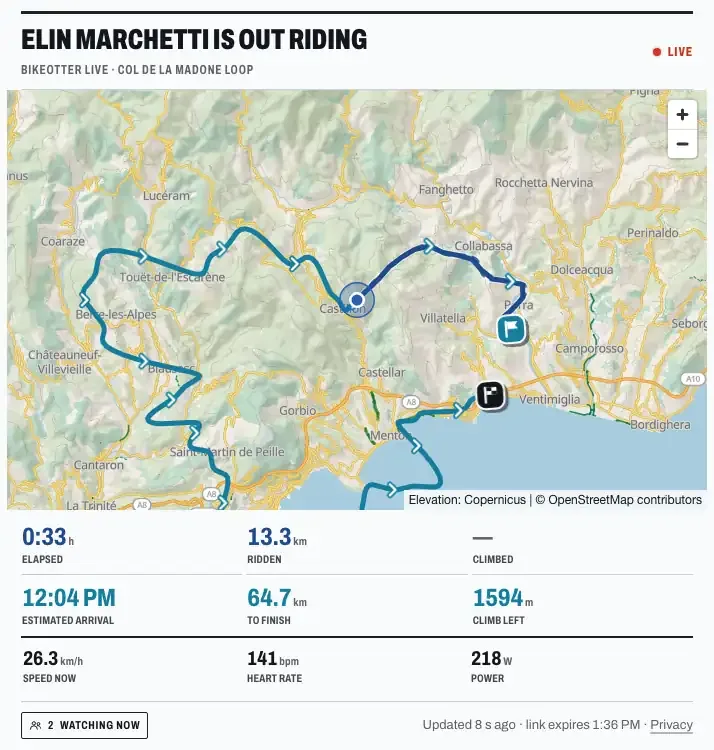
BikeOtter has its own live link that runs from its own app, so it doesn't depend on the Wahoo app or Wahoo's servers. It's not Wahoo's Live Track fixed; it's another way to be followed.
- Sign in to BikeOtter once with your email (a magic link, no password).
- On the Ride screen, turn on live sharing and tap Go live.
- Share the link, or set up a contact group that gets it by email every time you go live.
Followers open the link in a browser, without an account or app. They see your planned route, where you are on it, the distance and climbing left, an estimated arrival, and whether you are riding or paused. Speed and heart rate are behind privacy switches. If you lose signal, the phone keeps your positions and sends them when it is back, and the same link carries on. Live sharing is free. It works with a Garmin Edge too (beta).
The catch: an ELEMNT holds one phone connection at a time. While BikeOtter is connected, the Wahoo app isn't, so on a given ride you use one or the other. More in the feature book.
Which way should I use?
If Wahoo Live Track has worked for you before, go through the checks above: in most cases a permission or battery setting changed with a phone update. If it keeps failing on the same phone, or you want followers to see the route and an arrival time, try a live link from BikeOtter on your next ride. If the ride itself didn't reach Strava afterwards, see rides not uploading to Strava, and to save the file yourself, downloading a FIT file.
Related guides
Where these steps were checked
The official steps above follow the vendors' own help pages as of 25 Oct 2026. Menus move between app versions. If a step here no longer matches what you see, send a note to support and the guide gets fixed.