 BikeOtter
Live tracking for Wahoo ELEMNT and Garmin Edge riders
Flip one switch and the people at home get a link. They open it in a browser and see where you are and when you will be back. Free, and nothing to sign up for on their side.


How does live tracking work in BikeOtter?
On the Ride screen, switch on Let them follow along. The first time, you sign in with a link sent to your email, no password. Your phone then reads your position from the bike computer and posts it to a private link of the form bikeotter.app/r/…, which you send to whoever should follow.
You don't have to send it by hand every ride. Save ride contacts in groups such as Family or Club, and the default group gets the link by email the moment you go live. With Go live automatically switched on in Settings, the app starts the share when your head unit starts a ride and stops it when the ride ends. That switch is off until you turn it on.
Followers see you move as often as the app asks the unit for its position. That rate is a setting per bike computer, under Settings › Head unit, and a slower rate saves battery.
What do the people at home see?
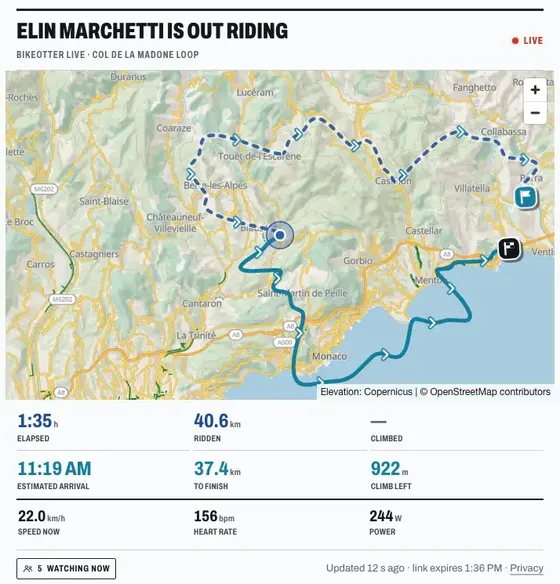
A map with your planned route and your own GPS trace. The part of the route you've ridden fades to a dotted line, the part ahead stays bright with arrows, so the direction of a loop is never a guess. Under the map: time, distance ridden and climbing so far, and beside them what is still to come, including when you'll arrive. Speed sits underneath. Heart rate and power only show if you switch them on, and that switch starts off.
When you stop for coffee, the page says PAUSED instead of showing a dot that quietly stopped moving. You see how many people are watching, but not who they are.
Can they see when I'll be home?
Yes, on a ride with a route. The estimated arrival appears once your average speed has settled, and it knows about the climbs still ahead. Instead of dividing the distance left by your average speed, BikeOtter works out what your speed would be on the flat and spends it on the rest of the route's elevation profile. On 20 km to go with an 800 m climb in it, that is 53 minutes different from the simple estimate.
The people who got your link by email can also get a short note when you finish, with distance, moving time and when you got in, and if you like a heads-up about 15 minutes before you arrive. It is a switch per contact group, called Tell them when you get back, and it starts off. If the link runs out because nothing has been heard from your phone, nobody is told you got home.
Does it work with a Garmin Edge?
Yes, in beta. BikeOtter reads the position from an Edge and posts it to the same kind of link as an ELEMNT's, so your followers get the same page. This is confirmed on an Edge 540. Heart rate, power and cadence from an Edge need the BikeOtter Live data field from the Connect IQ store. The Garmin page keeps track of what works today, and the Wahoo page does the same for each ELEMNT.
Do followers need an account or the app?
No. The link opens in any browser. Pasted into WhatsApp, Slack, Telegram or Discord, it arrives as a card with your route on a map rather than a bare address.
If you allow it for a contact group, people in that group get a message box on the page. A message under five minutes old shows up on your ELEMNT's screen; anything older waits in the app, so nothing pops up halfway down a descent. Messages are capped at 160 characters and 3 an hour per person.
What happens when my phone battery runs low?
At 10% and not charging, the page tells your followers that your phone battery is low and updates may slow or stop. They never see a percentage. At the same time the app sends your position less often, to make what is left last longer. Plug in at a café and the notice clears.
The link itself is hard to kill. A tunnel or a valley without signal costs you that stretch and no more, the trace refills when signal is back, and an app restart picks up the same link. If sharing does break for 30 seconds, your ELEMNT shows a card saying why: no connection, sign-in expired, or a server error.
What do I see on my own phone?
On Android, the ongoing notification says what is running: recording a ride, sharing your live position, or just connected, with distance, climb and speed while you record. On an iPhone, a Live Activity appears on the Lock Screen and in the Dynamic Island while you record or share, with how long you've been sharing, how many people are watching and the distance. From iOS 17 it has a Stop button.
How does this compare with Wahoo Live Track and Garmin LiveTrack?
Both bike computer makers have their own, and they are the first thing to try. Wahoo Live Track is built into the Wahoo app: turn it on, then share the link or have it emailed automatically at the start of a ride. Per Wahoo's help page, the phone needs a data connection and the app has to stay connected to the unit during the ride. Garmin LiveTrack lives in the Garmin Connect app: you invite followers by email or social media, and they watch your live data on a web page, as the Edge 540 manual puts it. Garmin's GroupRide and GroupTrack show other Garmin riders on the Edge's own screen.
BikeOtter needs a phone with data too. What it adds:
- one kind of link for an ELEMNT and an Edge, so a mixed group of friends follows the same way
- an arrival time that accounts for the climbs ahead, and a note when you get in
- the low-battery notice, and messages from home onto the ELEMNT
- group rides with every rider on one map
- rebuilding a ride from the live track if your unit's recording comes back empty (Plus)
Is it free, and what is stored?
Live tracking is free and stays free: it is there so somebody knows where you are. Plus adds messages from followers, rebuilding a ride from the live track, and hosting group rides. The pricing page has the full list.
The link is the key: 20 random characters, and anyone holding it can watch, so send it to people you want watching. A link stops working 6 hours after you start it, and sooner if nothing has been heard from your phone for 45 minutes. The session and every point in it are deleted 7 days after the ride ends. The privacy policy lists every field a live point carries. The feature book has the rest of the live tracking chapter.
Get BikeOtter
Free on iPhone and Android. Your bike computer needs to be set up in its maker's own app once; after that, pair it in BikeOtter.