 BikeOtter
Group rides with Wahoo and Garmin on one map
Share one link. Everybody joins from their phone, and the whole group rides on one live map, whichever bike computer each of them has on the bars.


How does a group ride work in BikeOtter?
The host starts a group ride in the app, either from a route or from the live sharing panel on the Ride screen, and shares the link or its QR code. Riders tap it and BikeOtter opens an invitation first: the planned route on a map, who is hosting, who has joined and where they are right now. Nothing happens until they press Join this ride, and the line above the button says what joining does.
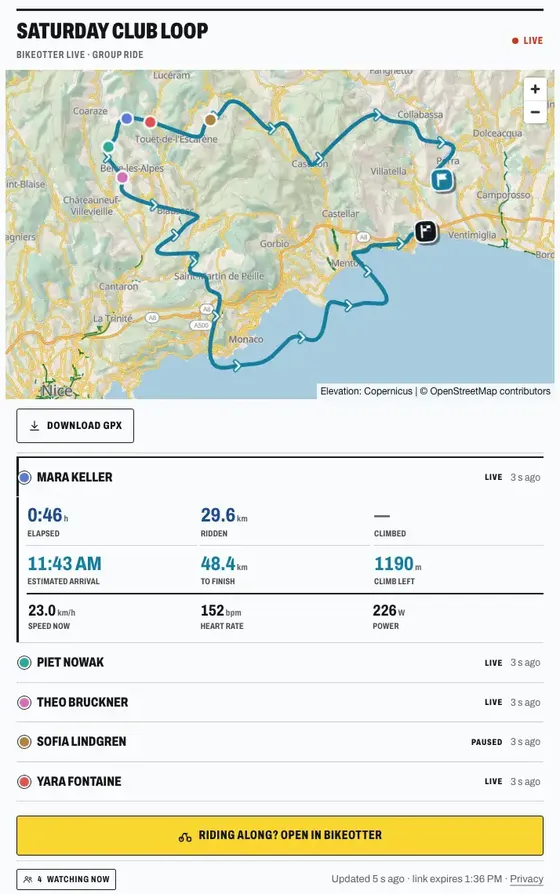
Joining copies the host's route into your own library and makes it the active one, so you can send it to your own bike computer before you roll. Once you ride, your phone reads your position from the head unit and posts it to the group. In the app, the Ride screen shows the others on a small map and in a list with the gap to each of them along the route, not as the crow flies. A group holds up to 50 riders.
Can I see the other riders on my bike computer?

On a first or second-generation ELEMNT BOLT or ROAM, yes. Your group-mates appear as markers on the unit's own map, each tagged with initials: JB, and JB2 if two riders share them. Only riders more than 300 m away are drawn, because the people next to you are already in sight, and a marker clears when someone leaves the group. It travels over Bluetooth on the ELEMNT's own live-track marker channel, so it needs no cloud. It is on by default: the switch is Riders on the head unit, under Settings › Connections & sharing.
The third-generation units (BOLT 3, ROAM 3 and ACE) accept the markers but don't draw them. On those, the group is on your phone and on the web page, not on the unit's map.
On a Garmin Edge, BikeOtter does not put markers on the Edge's screen. Garmin support in BikeOtter is in beta: an Edge's position reaches the group's live map like an ELEMNT's does, which has been confirmed on an Edge 540. If your whole group rides Garmin, Garmin's own GroupRide (Edge 540, 840, 1040 and later) and GroupTrack (older Edges) already show other Garmin riders on the unit, and they are worth trying first. More on what works today is on the Garmin page.
Does it work when the group mixes Wahoo and Garmin?
That is what it is for. A BikeOtter group is held together by its link, not by who follows whom in which app. An ELEMNT rider and an Edge rider join the same way and end up on the same map. Each rider signs in to BikeOtter once with an email link, no password. The Wahoo page lists what BikeOtter does on each ELEMNT model.
What do people at home see?
The same link opens in any browser, with no account and no app. The page shows everyone on one map over the route, with the route's name, distance and climb, and a button to download it as a GPX. Tap a rider in the list to see their own numbers: time, distance ridden, climbing, estimated arrival, and what is still to go. Heart rate and power appear only for riders who chose to share them, and that switch starts off. Pasted into WhatsApp, Slack, Telegram or Discord, the link shows up as a card with the route drawn on a map.
Can I plan the ride before the day?
Yes. Create the group ride from a route, set the start time and share the link today. Friends join days ahead and take the route into their own library, without going live. If you already checked the weather, a summary of that forecast travels with the plan. Nobody's position is shared until somebody actually sets off on the day. A planned ride stays joinable for up to 30 days before it starts.
Can we race each other?
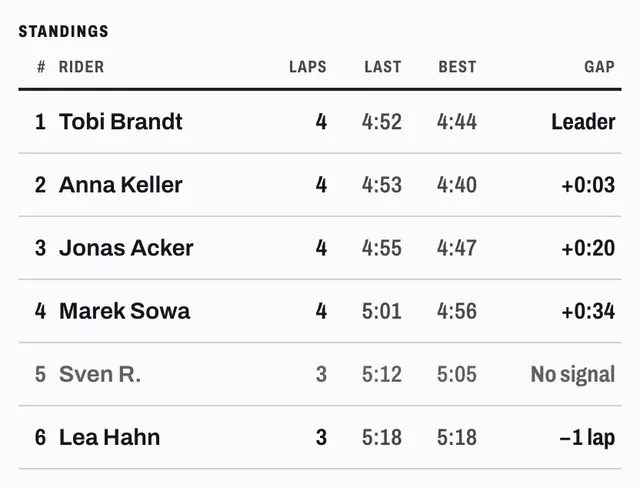
A group ride can be a race. Pick a route that rides the same loop several times, set the laps and drag the start and finish bar to the real line. Laps are counted on the phone from the bike computer's position. Your unit gets a message after each lap, a bell for the last one, and a note when a friend comes within 100, 200 or 400 m of you along the course. Afterwards the warm-up is cut off before the ride goes to Strava. Anyone with the link can follow the standings and lap chart in a browser. A race holds 15 racers. The Ride together chapter of the feature book has the details.
What if somebody's phone is dying?
When a rider's phone drops to 10% and isn't charging, the group page shows a short note on that rider's row, so the others can tell a flat phone from a lost signal. Their app also sends positions less often to stretch what is left. Nobody sees a percentage, only that the battery is low.
What does it cost?
Joining a group ride is free, and so is live tracking. Hosting a group ride is part of BikeOtter Plus, and you can host a few for free before deciding. Hosting a race is Plus too; racing or watching one is free. The pricing page has the full split.
What happens to our positions?
The link is the key: anyone who has it can watch, so share it with people you want watching. A group link works for 12 hours after the ride goes live, and the group record is deleted 7 days after it ends. Each rider's live points are deleted with their session, 7 days after the ride. Race lap times are kept for 90 days so everyone can look back at the results. The privacy policy lists exactly what a live point contains.
For one rider and the people waiting at home, see live tracking. For everything else the app does on a ride, the feature book starts with live tracking and works through the rest.
Get BikeOtter
Free on iPhone and Android. Your bike computer needs to be set up in its maker's own app once; after that, pair it in BikeOtter.